
How to find your Honda radio serial number
You need the radio serial before anyone can look up the unlock code. On many Hondas from the early 2000s onward, you can show it on the display without pulling the unit.
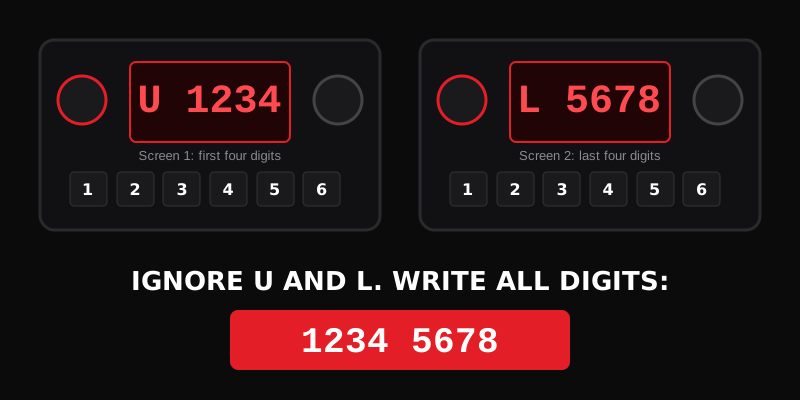
Method A: Presets 1 and 6 (common audio units)
- Ignition ON.
- Turn the radio on and confirm it shows CODE (or COdE). If it does not, see your owner's manual.
- Turn the radio OFF.
- Press and hold preset buttons 1 and 6, then turn the radio ON while holding them.
- The display often toggles between a U screen (first four digits) and an L screen (last four digits).
- Ignore the letters U and L. Write down all eight digits in order.
Method B: SEEK / CH method (some Accord and nav-era units)
On some units, with CODE showing, turn the radio off, hold the top halves of SEEK/SKIP and CH/DISC, then press and release PWR/VOL. You still get U and L digit groups. Use your model year's owner's manual if the buttons differ.
Method C: Glovebox card or sticker
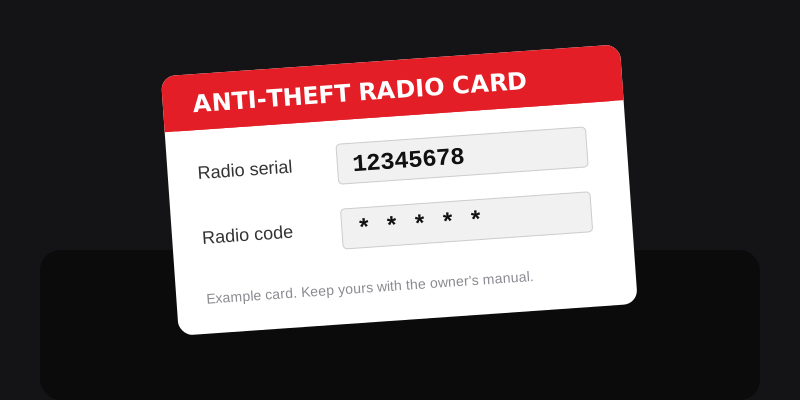
Many cars have an anti-theft ID card or a dealer sticker in the glovebox with the serial and sometimes the code itself.
Method D: Label on the radio body
On older Hondas (roughly 2001 and earlier, and some units that will not show digits on screen), the serial is on a label on the side or top of the radio. That can mean removing the unit. A dealer can do this if you prefer.
Reading tips
- Do not confuse 0 and O, 1 and I, 8 and B.
- Enter only the digits the team asks for.
- Navigation systems can have a separate serial and a separate navigation code. Audio and nav are not always the same number.
What we need on the form
Brand, model, the serial you recorded, and your email. We do not ask you to remove the radio if the on-screen method works.
Next: how to enter your Honda radio code or read the FAQ.